[EtherCAT]
2025.12.30, EtherCAT CiA 402 v1.2.
You can download the EtherCAT CiA 402 User Manual file here.
1. Introduction
1.1 About QEC MainDevice (MDevice)
QEC MDevice is an EtherCAT MDevice compatible with 86Duino Coding IDE 501+. It offers real-time EtherCAT communication between the EtherCAT MDevice and the EtherCAT SubDevice. Except for the EtherCAT Library of 86Duino IDE, QEC MDevice also provides Modbus, Ethernet TCP/IP, CAN bus, etc., industrial communication protocols, and uses a rich high-level C/C++ programming language for rapid application development.
For additional QEC and EtherCAT details, please refer to the EtherCAT Library API User Manual.
1.1.1 What is 86Duino IDE?
The 86Duino integrated development environment (IDE) software makes it easy to write and upload code to 86Duino boards and QEC MDevice. It runs on Windows, Mac OS X, and Linux. The environment is written in Java and based on Arduino IDE, Processing, DJGPP, and other open-source software, which can be downloaded from https://www.qec.tw/software/.

QEC MDevice’s software, 86Duino IDE, also offers a configuration utility: 86EVA, a graphic user interface tool for users to edit parameters for the EtherCAT network; its functions are as follows:
- EtherCAT SubDevice scanning
- Import ENI file
- Setting EtherCAT MDevice
- Configure EtherCAT SubDevice
For additional details, please refer to the 86EVA User Manual.
1.2 About EthercatDevice_CiA402
EthercatDevice_CiA402 is a generic CiA 402 EtherCAT SubDevice class designed to control any EtherCAT servo drive that supports the CiA 402 standard.
It provides access functions for commonly used CiA 402 objects and operation functions for several CiA 402 operation modes and function groups, including:
- Operation Modes
- Profile Position (pp)
- Profile Velocity (pv)
- Profile Torque (tq)
- Homing (hm)
- Cyclic Synchronous Position (csp)
- Cyclic Synchronous Velocity (csv)
- Cyclic Synchronous Torque (cst)
- Function Groups
- Touch Probe
Implementation Directive for CiA402 Drive Profile.
Directive for using IEC 61800-7-201 within EtherCAT-based servo drives.
For more detailed information about CiA 402, please refer to the following documents:
- CiA Draft Standard 402: CiA® 402-CANopen Drives and Motion Control Profile.
- ETG.6010 Implementation Directive for CiA402 Drive Profile
- User manual for the currently used CiA 402 drive device
The class relationships of EthercatDevice_CiA402 are illustrated in the following diagram:

- EthercatDevice_CiA402 inherits from _EthercatDevice_CommonDriver.
For more detailed information about EtherCAT Device Class, please refer to EtherCAT Library API User Manual.
1.2.1 Drives and Motion Control
The device control function block controls all functions of the drive (drive function and power section). It is divided into device control of the state machine and the operation mode function.
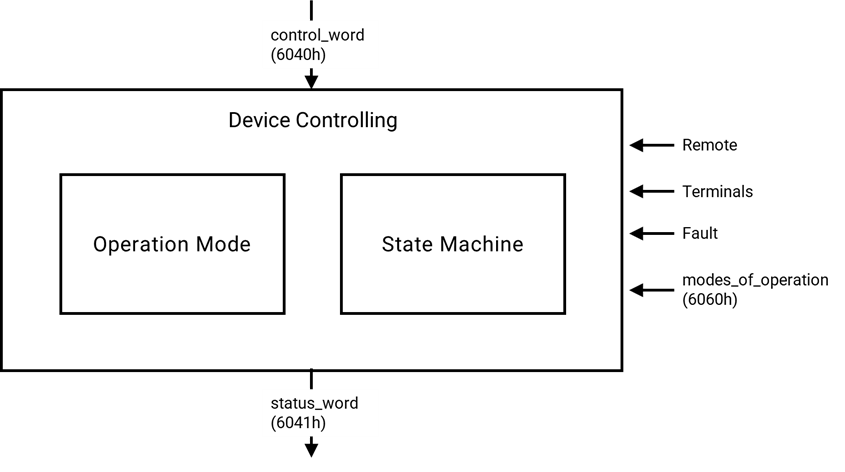
The controlword can control the state of the drive.
The state of the drive is shown in the statusword.
In remote mode, the device is controlled directly from the CANopen network by PDO and SDO.
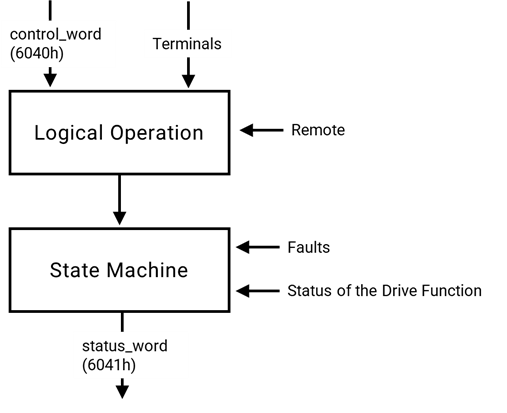
The state machine is controlled externally by the controlword and external signals. The write access to the controlword is controlled by the optional hardware signal ‘Remote’. The state machine is also controlled by internal signals like faults and modes of operation.
1.2.2 State machine
The state machine describes the device status and the possible control sequence of the drive. A single state represents a special internal or external behavior. The state of the drive also determines which commands are accepted. E.g. it is only possible to start a point-to-point move when the drive is in state OPERATION ENABLE.
States may be changed using the controlword and/or according to internal events. The current state can be read using the statusword.

State Description
| State | Description |
| Not Ready to Switch On | Drive is initializing or running a self-test. Brake (if present) is applied. Function disabled. |
| Switch On Disabled | Initialization complete, parameters set. High voltage not applied for safety. Function disabled. |
| Ready to Switch On | High voltage may be applied. Drive parameters can be modified. Function disabled. |
| Switched On | High voltage applied. Power amplifier is ready. Drive parameters can be modified. Function disabled. |
| Operation Enable | Fault detected. Drive function disabled. High-voltage switch-off depends on the application. |
| Quick Stop Active | Quick stop executed. Power removed, function disabled. To resume, send Enable Operation. |
| Fault Reaction Active | Fault detected. Quick stop is being executed. Power removed, function disabled. |
| Fault | Fault detected. Drive function disabled. High voltage switch-off depends on application. |
Notes:
- If a command is received that causes a change of state, this command must be processed completely and the new state attained before the next command can be processed.
- ‘Drive function is disabled’ implies no energy is supplied to the motor. This may be achieved by different manufacturers in different ways. Reference values are not processed.
- ‘Drive function is enabled’ implies that energy can be supplied to the motor. The reference values (torque, velocity, position) are processed.
- ‘Fault occurred’ implies that a fault in the drive has occurred. In this case, there is a transition to the state FAULT REACTION ACTIVE. In this state the device will execute a special fault reaction. After the execution of this fault reaction, the device will switch to the state FAULT. This state can only be left by the command ‘Fault Reset’, but only if the fault is not active anymore.
2. Functions
This section will briefly introduce the EthercatDevice_CiA402 API usage list.
| Function Name | Description | Callback Available |
| Initialization-related functions | ||
attach() | Initialize the object of this EtherCAT SubDevice class. | |
detach() | Deinitialize the object of this EtherCAT SubDevice class. | |
isStepper() | Check if the EtherCAT SubDevice is a stepper motor drive. | O |
| Control-related functions | ||
getCiA402Mode() | Get the current mode of operation. (6061h) | O1 |
setCiA402Mode() | Switch the mode of operation. (6060h, 6061h, 6502h) | O1, 2 |
getCiA402State() | Get the current CiA 402 state. (6041h) | O |
setCiA402State() | Switch the CiA 402 state. (6040h, 6041h) | O2 |
enable() | Enable the drive function and power on the motor. (6040h, 6041h) | O2 |
disable() | Disable the drive function and power off the motor. (6040h, 6041h) | O2 |
| Operation-related functions | ||
setTargetPosition() | Set the target position. (607Ah) | O1 |
setTargetVelocity() | Set the target velocity. (60FFh) | O1 |
setTargetTorque() | Set the target torque. (6071h) | O1 |
setProfileAcceleration() | Set the profile acceleration. (6083h) | O1 |
setProfileDeceleration() | Set the profile deceleration. (6084h) | O1 |
setMaxAcceleration() | Set the max acceleration. (60C5h) | O1 |
setMaxDeceleration() | Set the max deceleration. (60C6h) | O1 |
setMaxProfileVelocity() | Set the max profile velocity. (607Fh) | O1 |
setMotionProfileType() | Set the motion profile type. (6086h) | O1 |
setPositionWindow() | Set the position window. (6067h) | O1 |
setPositionWindowTime() | Set the position window time. (6068h) | O1 |
setPositionOffset() | Set the position offset. (60B0h) | O1 |
setSoftwarePositionLimit() | Set the software position limit. (607Dh) | O1 |
setFollowingErrorWindow() | Set the following error window. (6065h) | O1 |
setPositionPolarity() | Set the position polarity. (607Eh) | O1 |
setVelocityWindow() | Set the velocity window. (606Dh) | O1 |
setVelocityWindowTime() | Set the velocity window time. (606Eh) | O1 |
setVelocityThreshold() | Set the velocity threshold. (606Fh) | O1 |
setVelocityOffset() | Set the velocity offset. (60B1h) | O1 |
setMaxMotorSpeed() | Set the max motor speed. (6080h) | O1 |
setVelocityPolarity() | Set the velocity polarity. (607Eh) | O1 |
setTorqueOffset() | Set the torque offset. (60B2h) | O1 |
setMaxTorque() | Set the max torque. (6072h) | O1 |
setPositiveTorqueLimit() | Set the positive torque limit. (60E0h) | O1 |
setNegativeTorqueLimit() | Set the negative torque limit. (60E1h) | O1 |
setQuickStopDeceleration() | Set the quick stop deceleration. (6085h) | O1 |
setQuickStopOptionCode() | Set the quick stop option code. (605Ah) | |
setShutdownOptionCode() | Set the shutdown option code. (605Bh) | |
setDisableOperationOptionCode() | Set the disable operation option code. (605Ch) | |
setHaltOptionCode() | Set the halt option code. (605Dh) | |
setFaultReactionOptionCode() | Set the fault reaction option code. (605Eh) | |
getErrorCode() | Get the error code. (603Fh) | O1 |
getSupportedDriveModes() | Get the supported drive modes. (6502h) | O1 |
getMotorResolution() | Get the motor resolution. (60EFh) | |
getPositionActualValue() | Get the position actual value. (6064h) | O1 |
getVelocityActualValue() | Get the velocity actual value. (606Ch) | O1 |
getTorqueActualValue() | Get the torque actual value. (6077h) | O1 |
getCurrentActualValue() | Get the current actual value. (6078h) | O1 |
getPositionDemandValue() | Get the position demand value. (6062h) | O1 |
getPositionDemandInternalValue() | Get the position demand internal value. (60FCh) | O1 |
getPositionActualInternalValue() | Get the position actual internal value. (6063h) | O1 |
getAdditionalPositionActualValue() | Get the additional position actual value. (60E4h) | O1 |
getFollowingErrorActualValue() | Get the following error actual value. (60F4h) | O1 |
getVelocityDemandValue() | Get the velocity demand value. (606Bh) | O1 |
getTorqueDemandValue() | Get the torque demand value. (6074h) | O1 |
getDigitalInputs() | Get the digital inputs. (60FDh) | O1 |
| Profile Position mode (pp) related functions | ||
pp_SetVelocity() | Set the profile velocity. (6081h) | |
pp_SetAcceleration() | Set the profile acceleration. (6083h) | |
pp_SetDeceleration() | Set the profile deceleration. (6084h) | |
pp_SetMotionProfileType() | Set the motion profile type. (6086h) | |
pp_Run() | Move to the target position. (6040h, 6041h, 607Ah) | |
pp_IsTargetReached() | Check if the target position has been reached. (6041h) | O |
pp_CheckFollowingError() | Check if the following error occurs. (6041h) | O |
pp_Halt() | Pause the current operation. (6040h, 6041h) | |
pp_Resume() | Resume the paused operation. (6040h, 6041h) | |
| Profile Velocity mode (pv) related functions | ||
pv_SetAcceleration() | Set the profile acceleration. (6083h) | |
pv_SetDeceleration() | Set the profile deceleration. (6084h) | |
pv_SetMotionProfileType() | Set the motion profile type. (6086h) | |
pv_Run() | Move at a target velocity continuously. (6041h, 60FFh) | |
pv_IsTargetReached() | Check if the target velocity has been reached. (6041h) | O |
pv_CheckZeroSpeed() | Check if the speed is zero. (6041h) | O |
pv_CheckMaxSlippageError() | Check if the maximum slippage error occurs. (6041h) | O |
pv_Halt() | Pause the current operation. (6040h, 6041h) | |
pv_Resume() | Resume the paused operation. (6040h, 6041h) | |
| Profile Torque mode (tq) related functions | ||
tq_SetTorqueSlope() | Set the torque slope. (6087h) | |
tq_SetTorqueProfileType() | Set the torque profile type. (6088h) | |
tq_SetMotorRatedCurrent() | Set the motor rated current. (6075h) | |
tq_SetMotorRatedTorque() | Set the motor rated torque. (6076h) | |
tq_Run() | Drive continuously at the target torque. (6041h, 6071h) | |
tq_IsTargetReached() | Check if the target torque has been reached. (6041h) | O |
tq_Halt() | Pause the current operation. (6040h, 6041h) | |
tq_Resume() | Resume the paused operation. (6040h, 6041h) | |
| Homing mode (hm) related functions | ||
hm_SetHomeOffset() | Set the home offset. (607Ch) | |
hm_SetHomingMethod() | Set the homing method. (6098h) | |
hm_SetHomingSpeeds() | Set the homing speeds. (6099h) | |
hm_SetHomingAcceleration() | Set the homing acceleration. (609Ah) | |
hm_Run() | Initiate a homing operation. (6040h, 6041h) | |
hm_IsAttained() | Check the status of the homing operation. (6041h) | O |
hm_Stop() | Stop the homing operation. (6040h, 6041h) | |
| Function Group “Touch Probe” related functions | ||
enableTouchProbe1() | Enable the touch probe 1. (60B8h, 60B9h, 60D0h) | |
enableTouchProbe2() | Enable the touch probe 2. (60B8h, 60B9h, 60D0h) | |
disableTouchProbe1() | Disable the touch probe 1. (60B8h, 60B9h) | |
disableTouchProbe2() | Disable the touch probe 2. (60B8h, 60B9h) | |
isTouchProbe1ValueReady() | Check if a positive or negative edge has occurred on the touch probe 1 signal. (60B9h) | O1 |
isTouchProbe2ValueReady() | Check if a positive or negative edge has occurred on the touch probe 2 signal. (60B9h) | O1 |
readTouchProbe1Value() | Read the touch probe position 1. (60BAh, 60BBh) | O1 |
readTouchProbe2Value() | Read the touch probe position 2. (60BCh, 60BDh) | O1 |
| Low-level functions for mode-specific flow control | ||
setHaltBit() | Set the halt bit in the controlword. (6040h) | O |
isTargetReached() | Check if the target has reached. (6041h) | O |
setModeSpecificBit4() | Set the bit 4 in the controlword. (6040h) | O |
setModeSpecificBit5() | Set the bit 5 in the controlword. (6040h) | O |
setModeSpecificBit6() | Set the bit 6 in the controlword. (6040h) | O |
checkModeSpecificBit12() | Check the value of bit 12 in the statusword. (6041h) | O |
checkModeSpecificBit13() | Check the value of bit 13 in the statusword. (6041h) | O |
- Note 1: This function can be used in callback functions if the related object is mapped to PDO.
- Note 2: This function will ignore the timeout parameter and will not wait for the actual value to match the set value when used in a callback.
3. Example
3.1 Profile Position (pp) control
Implement position control on a CiA 402 EtherCAT SubDevice supporting Profile Position mode (pp).
- Move a relative distance of 10,000 units in the positive direction.
- Move a relative distance of 10,000 units in the negative direction.
Here is the example code.
#include "Ethercat.h"

EthercatMaster master;
EthercatDevice_CiA402 motor;

void setup() {
  master.begin();
  motor.attach(0, master);
  motor.setCiA402Mode(CIA402_PP_MODE);
  master.start();

  motor.enable();
  motor.pp_SetMotionProfileType(0);
  motor.pp_SetVelocity(100000);
  motor.pp_SetAcceleration(5000);
  motor.pp_SetDeceleration(5000);
}

void loop() {
  motor.pp_Run(100000, CIA402_PP_RELATIVE, true);
  while (motor.pp_IsTargetReached() == 0);
  motor.pp_Run(-100000, CIA402_PP_RELATIVE, true);
  while (motor.pp_IsTargetReached() == 0);
}
3.2 Profile Position (pp) control in cyclic callback
Implement position control on a CiA 402 EtherCAT SubDevice supporting Profile Position mode (pp) in cyclic callback.
- Move a relative distance of 10,000 units in the positive direction.
- Move a relative distance of 10,000 units in the negative direction.
To operate in cyclic callback, the relevant objects must be mapped to PDOs as follows:
- Output PDO (RxPDO)
- Object 6040h: Controlword
- Object 607Ah: Target position
- Input PDO (TxPDO)
- Object 6041h: Statusword
- Object 6064h: Position actual value
Here is the example code.
#include "Ethercat.h"

EthercatMaster master;
EthercatDevice_CiA402 motor;

#define STATE_SET_COMMAND (0)
#define STATE_CHECK_ACK_SET (1)
#define STATE_CHECK_ACK_CLEAR (2)
#define STATE_WAIT_TARGET_REACHED (3)
int state = STATE_SET_COMMAND;
int toggle = 0;

void MyCyclicCallback()
{
  if (motor.getCiA402State() != CIA402_OPERATION_ENABLED)
    return;

  switch (state) {
    case STATE_SET_COMMAND:
      toggle = !toggle;
      motor.setTargetPosition(100000 * toggle - 100000 * !toggle);
      motor.setModeSpecificBit6(true);
      motor.setModeSpecificBit5(false);
      motor.setModeSpecificBit4(true);
      state = STATE_CHECK_ACK_SET;
      break;
    case STATE_CHECK_ACK_SET:
      if (motor.checkModeSpecificBit12()) {
        motor.setModeSpecificBit4(false);
        state = STATE_CHECK_ACK_CLEAR;
      }
      break;
    case STATE_CHECK_ACK_CLEAR:
      if (motor.checkModeSpecificBit12() == 0)
        state = STATE_WAIT_TARGET_REACHED;
      break;
    case STATE_WAIT_TARGET_REACHED:
      if (motor.pp_IsTargetReached())
        state = STATE_SET_COMMAND;
      break;
  }
}

void setup() {
  master.begin();

  motor.attach(0, master);
  motor.setCiA402Mode(CIA402_PP_MODE);

  /* RxPDO mapping configuration. */
  motor.sdoDownload8(0x1C12, 0x00, 0);
  motor.sdoDownload8(0x1601, 0x00, 0);
  motor.sdoDownload32(0x1601, 0x01, 0x60400010);
  motor.sdoDownload32(0x1601, 0x02, 0x607A0020);
  motor.sdoDownload8(0x1601, 0x00, 2);
  motor.sdoDownload16(0x1C12, 0x01, 0x1601);
  motor.sdoDownload8(0x1C12, 0x00, 1);
  /* TxPDO mapping configuration. */
  motor.sdoDownload8(0x1C13, 0x00, 0);
  motor.sdoDownload8(0x1A01, 0x00, 0);
  motor.sdoDownload32(0x1A01, 0x01, 0x60410010);
  motor.sdoDownload32(0x1A01, 0x02, 0x60640020);
  motor.sdoDownload8(0x1A01, 0x00, 2);
  motor.sdoDownload16(0x1C13, 0x01, 0x1A01);
  motor.sdoDownload8(0x1C13, 0x00, 1);
  master.attachCyclicCallback(MyCyclicCallback);
  master.start();

  motor.enable();
  motor.pp_SetMotionProfileType(0);
  motor.pp_SetVelocity(100000);
  motor.pp_SetAcceleration(5000);
  motor.pp_SetDeceleration(5000);
}

void loop() {
  // ...
}
3.3 Profile Velocity (pv) control
Implement velocity control on a CiA 402 EtherCAT SubDevice supporting Profile Velocity mode (pv).
- Move in the positive direction at a speed of 1,000 units per second for 3 seconds.
- Move in the negative direction at a speed of 1,000 units per second for 3 seconds.
Here is the example code.
#include "Ethercat.h"

EthercatMaster master;
EthercatDevice_CiA402 motor;

void setup() {
  master.begin();
  motor.attach(0, master);
  motor.setCiA402Mode(CIA402_PV_MODE);
  master.start();

  motor.enable();
  motor.pv_SetMotionProfileType(0);
  motor.pv_SetAcceleration(5000);
  motor.pv_SetDeceleration(5000);
}

void loop() {
  motor.pv_Run(1000);
  while (motor.pv_IsTargetReached() == 0);
  delay(3000);

  motor.pv_Run(-1000);
  while (motor.pv_IsTargetReached() == 0);
  delay(3000);
}
3.4 Profile Velocity (pv) control in cyclic callback
Implement velocity control on a CiA 402 EtherCAT SubDevice supporting Profile Velocity mode (pv).
- Move in the positive direction at a speed of 1,000 units per second for 3 seconds.
- Move in the negative direction at a speed of 1,000 units per second for 3 seconds.
To operate in cyclic callback, the relevant objects must be mapped to PDOs as follows:
- Output PDO (RxPDO)
- Object 6040h: Controlword
- Object 60FFh: Target velocity
- Input PDO (TxPDO)
- Object 6041h: Statusword
- Object 606Ch: Velocity actual value
Here is the example code.
#include "Ethercat.h"

EthercatMaster master;
EthercatDevice_CiA402 motor;

int toggle = 0;
int cycle_count = 3000;

void MyCyclicCallback()
{
  if (motor.getCiA402State() != CIA402_OPERATION_ENABLED)
    return;

  if (++cycle_count < 3000)
    return;

  cycle_count = 0;
  toggle = !toggle;
  motor.setTargetVelocity(1000 * toggle - 1000 * !toggle);
}

void setup() {
  master.begin();
  motor.attach(0, master);
  motor.setCiA402Mode(CIA402_PV_MODE);

  /* RxPDO mapping configuration. */
  motor.sdoDownload8(0x1C12, 0x00, 0);
  motor.sdoDownload8(0x1601, 0x00, 0);
  motor.sdoDownload32(0x1601, 0x01, 0x60400010);
  motor.sdoDownload32(0x1601, 0x02, 0x60FF0020);
  motor.sdoDownload8(0x1601, 0x00, 2);
  motor.sdoDownload16(0x1C12, 0x01, 0x1601);
  motor.sdoDownload8(0x1C12, 0x00, 1);
  /* TxPDO mapping configuration. */
  motor.sdoDownload8(0x1C13, 0x00, 0);
  motor.sdoDownload8(0x1A01, 0x00, 0);
  motor.sdoDownload32(0x1A01, 0x01, 0x60410010);
  motor.sdoDownload32(0x1A01, 0x02, 0x606C0020);
  motor.sdoDownload8(0x1A01, 0x00, 2);
  motor.sdoDownload16(0x1C13, 0x01, 0x1A01);
  motor.sdoDownload8(0x1C13, 0x00, 1);

  master.attachCyclicCallback(MyCyclicCallback);
  master.start(1000000);

  motor.enable();
  motor.pv_SetMotionProfileType(0);
  motor.pv_SetAcceleration(5000);
  motor.pv_SetDeceleration(5000);
}

void loop() {
  // ...
}
3.5 Profile Torque (tq) control
Implement torque control on a CiA 402 EtherCAT SubDevice supporting Profile Torque mode (tq).
- Maintain a positive torque of 50 units for 3 seconds.
- Maintain a negative torque of 50 units for 3 seconds.
Here is the example code.
#include "Ethercat.h"

EthercatMaster master;
EthercatDevice_CiA402 motor;

void setup() {
  master.begin();
  motor.attach(0, master);
  motor.setCiA402Mode(CIA402_TQ_MODE);
  master.start();

  motor.enable();
  motor.tq_SetTorqueProfileType(0);
  motor.tq_SetTorqueSlope(200);
  motor.tq_SetMotorRatedTorque(0);
  motor.tq_SetMotorRatedCurrent(0);
}

void loop() {
  motor.tq_Run(50);
  while (motor.tq_IsTargetReached() == 0);
  delay(3000);

  motor.tq_Run(-50);
  while (motor.tq_IsTargetReached() == 0);
  delay(3000);
}
3.6 Profile Torque (tq) control in cyclic callback
Implement torque control on a CiA 402 EtherCAT SubDevice supporting Profile Torque mode (tq).
- Maintain a positive torque of 50 units for 3 seconds.
- Maintain a negative torque of 50 units for 3 seconds.
To operate in cyclic callback, the relevant objects must be mapped to PDOs as follows:
- Output PDO (RxPDO)
- Object 6040h: Controlword
- Object 6071h: Target torque
- Input PDO (TxPDO)
- Object 6041h: Statusword
- Object 6077h: Torque actual value
Here is the example code.
#include "Ethercat.h"

EthercatMaster master;
EthercatDevice_CiA402 motor;

int toggle = 0;
int cycle_count = 3000;

void MyCyclicCallback()
{
  if (motor.getCiA402State() != CIA402_OPERATION_ENABLED)
    return;

  if (++cycle_count < 3000)
    return;

  cycle_count = 0;
  toggle = !toggle;
  motor.setTargetTorque(50 * toggle - 50 * !toggle);
}

void setup() {
  master.begin();
  motor.attach(0, master);
  motor.setCiA402Mode(CIA402_TQ_MODE);
  /* RxPDO mapping configuration. */
  motor.sdoDownload8(0x1C12, 0x00, 0);
  motor.sdoDownload8(0x1601, 0x00, 0);
  motor.sdoDownload32(0x1601, 0x01, 0x60400010);
  motor.sdoDownload32(0x1601, 0x02, 0x60710010);
  motor.sdoDownload8(0x1601, 0x00, 2);
  motor.sdoDownload16(0x1C12, 0x01, 0x1601);
  motor.sdoDownload8(0x1C12, 0x00, 1);
  /* TxPDO mapping configuration. */
  motor.sdoDownload8(0x1C13, 0x00, 0);
  motor.sdoDownload8(0x1A01, 0x00, 0);
  motor.sdoDownload32(0x1A01, 0x01, 0x60410010);
  motor.sdoDownload32(0x1A01, 0x02, 0x60770010);
  motor.sdoDownload8(0x1A01, 0x00, 2);
  motor.sdoDownload16(0x1C13, 0x01, 0x1A01);
  motor.sdoDownload8(0x1C13, 0x00, 1);

  master.attachCyclicCallback(MyCyclicCallback);
  master.start(1000000);

  motor.enable();
  motor.tq_SetTorqueProfileType(0);
  motor.tq_SetTorqueSlope(200);
  motor.tq_SetMotorRatedTorque(0);
  motor.tq_SetMotorRatedCurrent(0);
}

void loop() {
  // ...
}
3.7 Homing (hm) operation
Initiate the homing method 33 operation on a CiA 402 compliant EtherCAT SubDevice.
Here is the example code.
#include "Ethercat.h"

EthercatMaster master;
EthercatDevice_CiA402 motor;

void setup() {
  master.begin();
  motor.attach(0, master);
  motor.setCiA402Mode(CIA402_HOMING_MODE);
  master.start();

  motor.enable();

  motor.hm_SetHomingMethod(CIA402_HM33);
  motor.hm_SetHomeOffset(0);
  motor.hm_SetHomingSpeeds(100, 20);
  motor.hm_SetHomingAcceleration(100);
  motor.hm_Run();
  while (motor.hm_IsAttained() == CIA402_HM_RUNNING);
}

void loop() {
  // ...
}
3.8 Cyclic synchronous position (CSP) control in cyclic callback
Implement Cyclic Synchronous Position (CSP) control on a CiA 402 EtherCAT SubDevice.
- The target position is incremented by 1,000 units in each cycle.
To operate in cyclic callback, the relevant objects must be mapped to PDOs as follows:
- Output PDO (RxPDO)
- Object 6040h: Controlword
- Object 607Ah: Target position
- Input PDO (TxPDO)
- Object 6041h: Statusword
- Object 6064h: Position actual value
Here is the example code.
#include "Ethercat.h"

EthercatMaster master;
EthercatDevice_CiA402 motor;

int32_t position = 0;

void MyCyclicCallback()
{
  if (motor.getCiA402State() != CIA402_OPERATION_ENABLED)
    return;

  motor.setTargetPosition(position += 1000);
}

void setup() {
  master.begin();

  motor.attach(0, master);
  motor.setDc(1000000);
  motor.setCiA402Mode(CIA402_CSP_MODE);

  /* RxPDO mapping configuration. */
  motor.sdoDownload8(0x1C12, 0x00, 0);
  motor.sdoDownload8(0x1601, 0x00, 0);
  motor.sdoDownload32(0x1601, 0x01, 0x60400010);
  motor.sdoDownload32(0x1601, 0x02, 0x607A0020);
  motor.sdoDownload8(0x1601, 0x00, 2);
  motor.sdoDownload16(0x1C12, 0x01, 0x1601);
  motor.sdoDownload8(0x1C12, 0x00, 1);
  /* TxPDO mapping configuration. */
  motor.sdoDownload8(0x1C13, 0x00, 0);
  motor.sdoDownload8(0x1A01, 0x00, 0);
  motor.sdoDownload32(0x1A01, 0x01, 0x60410010);
  motor.sdoDownload32(0x1A01, 0x02, 0x60640020);
  motor.sdoDownload8(0x1A01, 0x00, 2);
  motor.sdoDownload16(0x1C13, 0x01, 0x1A01);
  motor.sdoDownload8(0x1C13, 0x00, 1);

  master.attachCyclicCallback(MyCyclicCallback);
  master.start(1000000, ECAT_SYNC);

  motor.setTargetPosition(position = motor.getPositionActualValue());
  motor.enable();
}

void loop() {
  // ...
}
3.9 Cyclic synchronous velocity (CSV) control in cyclic callback
Implement Cyclic Synchronous Velocity (CSV) control on a CiA 402 EtherCAT SubDevice.
- The target velocity is incremented by 1 unit each cycle until it reaches 3,000 units.
- The target velocity is decremented by 1 unit each cycle until it reaches -3,000 units.
To operate in cyclic callback, the relevant objects must be mapped to PDOs as follows:
- Output PDO (RxPDO)
- Object 6040h: Controlword
- Object 60FFh: Target velocity
- Input PDO (TxPDO)
- Object 6041h: Statusword
- Object 606Ch: Velocity actual value
Here is the example code.
#include "Ethercat.h"

EthercatMaster master;
EthercatDevice_CiA402 motor;

int32_t velocity = 0;
int toggle = 0;

void MyCyclicCallback()
{
  if (motor.getCiA402State() != CIA402_OPERATION_ENABLED)
    return;

  if (abs(velocity) >= 3000)
    toggle = !toggle;

  velocity = velocity + toggle - !toggle;
  motor.setTargetVelocity(velocity);
}

void setup() {
  master.begin();
  motor.attach(0, master);
  motor.setDc(1000000);
  motor.setCiA402Mode(CIA402_CSV_MODE);

  /* RxPDO mapping configuration. */
  motor.sdoDownload8(0x1C12, 0x00, 0);
  motor.sdoDownload8(0x1601, 0x00, 0);
  motor.sdoDownload32(0x1601, 0x01, 0x60400010);
  motor.sdoDownload32(0x1601, 0x02, 0x60FF0020);
  motor.sdoDownload8(0x1601, 0x00, 2);
  motor.sdoDownload16(0x1C12, 0x01, 0x1601);
  motor.sdoDownload8(0x1C12, 0x00, 1);
  /* TxPDO mapping configuration. */
  motor.sdoDownload8(0x1C13, 0x00, 0);
  motor.sdoDownload8(0x1A01, 0x00, 0);
  motor.sdoDownload32(0x1A01, 0x01, 0x60410010);
  motor.sdoDownload32(0x1A01, 0x02, 0x606C0020);
  motor.sdoDownload8(0x1A01, 0x00, 2);
  motor.sdoDownload16(0x1C13, 0x01, 0x1A01);
  motor.sdoDownload8(0x1C13, 0x00, 1);

  master.attachCyclicCallback(MyCyclicCallback);
  master.start(1000000, ECAT_SYNC);

  motor.setTargetVelocity(0);
  motor.enable();
}

void loop() {
  // ...
}
3.10 Cyclic synchronous torque (CST) control in cyclic callback
Implement Cyclic Synchronous Torque (CST) control on a CiA 402 EtherCAT SubDevice.
- The target torque is incremented by 1 unit each cycle until it reaches 50 units.
- The target torque is decremented by 1 unit each cycle until it reaches -50 units.
To operate in cyclic callback, the relevant objects must be mapped to PDOs as follows:
- Output PDO (RxPDO)
- Object 6040h: Controlword
- Object 6071h: Target torque
- Input PDO (TxPDO)
- Object 6041h: Statusword
- Object 6077h: Torque actual value
Here is the example code.
#include "Ethercat.h"

EthercatMaster master;
EthercatDevice_CiA402 motor;

int16_t torque = 0;
int toggle = 0;

void MyCyclicCallback()
{
  if (motor.getCiA402State() != CIA402_OPERATION_ENABLED)
    return;

  if (abs(torque) >= 50)
    toggle = !toggle;

  torque = torque + toggle - !toggle;
  motor.setTargetTorque(torque);
}

void setup() {
  master.begin();
  motor.attach(0, master);
  motor.setDc(1000000);
  motor.setCiA402Mode(CIA402_CST_MODE);

  /* RxPDO mapping configuration. */
  motor.sdoDownload8(0x1C12, 0x00, 0);
  motor.sdoDownload8(0x1601, 0x00, 0);
  motor.sdoDownload32(0x1601, 0x01, 0x60400010);
  motor.sdoDownload32(0x1601, 0x02, 0x60710010);
  motor.sdoDownload8(0x1601, 0x00, 2);
  motor.sdoDownload16(0x1C12, 0x01, 0x1601);
  motor.sdoDownload8(0x1C12, 0x00, 1);
  /* TxPDO mapping configuration. */
  motor.sdoDownload8(0x1C13, 0x00, 0);
  motor.sdoDownload8(0x1A01, 0x00, 0);
  motor.sdoDownload32(0x1A01, 0x01, 0x60410010);
  motor.sdoDownload32(0x1A01, 0x02, 0x60770010);
  motor.sdoDownload8(0x1A01, 0x00, 2);
  motor.sdoDownload16(0x1C13, 0x01, 0x1A01);
  motor.sdoDownload8(0x1C13, 0x00, 1);

  master.attachCyclicCallback(MyCyclicCallback);
  master.start(1000000, ECAT_SYNC);

  motor.setTargetTorque(0);
  motor.enable();
}

void loop() {
  // ...
}
Appendix
A.1 Error List
For most functions, a returned value less than zero indicates an error, and the value represents an error code. If there is an error code, you can find the error cause and corrective actions below.
| Definition | Code |
ECAT_SUCCESS | 0 |
ECAT_ERR_MODULE_INIT_FAIL | -100 |
ECAT_ERR_MODULE_GET_VERSION_FAIL | -101 |
ECAT_ERR_MODULE_VERSION_MISMATCH | -102 |
ECAT_ERR_MODULE_GENERIC_TRANSFER_INIT_FAIL | -103 |
ECAT_ERR_MASTER_DOWNLOAD_SETTINGS_FAIL | -200 |
ECAT_ERR_MASTER_SET_DEVICE_SETTINGS_FAIL | -201 |
ECAT_ERR_MASTER_GET_GROUP_INFO_FAIL | -202 |
ECAT_ERR_MASTER_GET_MASTER_INFO_FAIL | -203 |
ECAT_ERR_MASTER_GET_DEVICE_INFO_FAIL | -204 |
ECAT_ERR_MASTER_SET_GROUP_SETTINGS_FAIL | -205 |
ECAT_ERR_MASTER_MAPPING_INIT_FAIL | -206 |
ECAT_ERR_MASTER_INTERRUPT_INIT_FAIL | -207 |
ECAT_ERR_MASTER_ACTIVE_FAIL | -208 |
ECAT_ERR_MASTER_ENI_INITCMDS_FAIL | -209 |
ECAT_ERR_MASTER_NO_DEVICE | -210 |
ECAT_ERR_MASTER_ACYCLIC_INIT_FAIL | -300 |
ECAT_ERR_MASTER_ACYCLIC_REQUEST_FAIL | -301 |
ECAT_ERR_MASTER_ACYCLIC_BUSY | -302 |
ECAT_ERR_MASTER_ACYCLIC_TIMEOUT | -303 |
ECAT_ERR_MASTER_ACYCLIC_ERROR | -304 |
ECAT_ERR_MASTER_ACYCLIC_WRONG_STATUS | -405 |
ECAT_ERR_MASTER_GENERIC_SEND_FAIL | -400 |
ECAT_ERR_MASTER_GENERIC_RECV_FAIL | -401 |
ECAT_ERR_MASTER_NOT_BEGIN | -1000 |
ECAT_ERR_MASTER_WRONG_BUFFER_SIZE | -1001 |
ECAT_ERR_MASTER_REDUNDANCY_NO_DC | -1002 |
ECAT_ERR_MASTER_MEMORY_ALLOCATION_FAIL | -1003 |
ECAT_ERR_MASTER_OSLAYER_INIT_FAIL | -1004 |
ECAT_ERR_MASTER_NIC_INIT_FAIL | -1005 |
ECAT_ERR_MASTER_BASE_INIT_FAIL | -1006 |
ECAT_ERR_MASTER_CIA402_INIT_FAIL | -1007 |
ECAT_ERR_MASTER_SETUP_PDO_FAIL | -1008 |
ECAT_ERR_MASTER_SCAN_NETWORK_FAIL | -1009 |
ECAT_ERR_MASTER_START_MASTER_FAIL | -1010 |
ECAT_ERR_MASTER_CYCLETIME_TOO_SMALL | -1011 |
ECAT_ERR_MASTER_DUMP_OUTPUT_PDO_FAIL | -1012 |
ECAT_ERR_MASTER_CONFIG_DEVICE_FAIL | -1013 |
ECAT_ERR_MASTER_CONFIG_MAPPING_FAIL | -1014 |
ECAT_ERR_MASTER_WAIT_BUS_SYNC_TIMEOUT | -1015 |
ECAT_ERR_MASTER_WAIT_MASTER_SYNC_TIMEOUT | -1016 |
ECAT_ERR_MASTER_CYCLIC_START_FAIL | -1017 |
ECAT_ERR_MASTER_WRONG_BUFFER_POINTER | -1018 |
ECAT_ERR_MASTER_ENI_INIT_FAIL | -1050 |
ECAT_ERR_MASTER_ENI_MISMATCH | -1051 |
ECAT_ERR_MASTER_STOPPED | -1100 |
ECAT_ERR_MASTER_STARTED | -1101 |
ECAT_ERR_MASTER_NOT_IN_PREOP | -1102 |
ECAT_ERR_MASTER_NOT_IN_SAFEOP | -1103 |
ECAT_ERR_MASTER_NOT_IN_OP | -1104 |
ECAT_ERR_MASTER_II_TRANSITION_FAIL | -1200 |
ECAT_ERR_MASTER_IP_TRANSITION_FAIL | -1201 |
ECAT_ERR_MASTER_PS_TRANSITION_FAIL | -1202 |
ECAT_ERR_MASTER_SO_TRANSITION_FAIL | -1203 |
ECAT_ERR_DEVICE_NOT_EXIST | -2000 |
ECAT_ERR_DEVICE_NOT_ATTACH | -2001 |
ECAT_ERR_DEVICE_NO_MAILBOX | -2002 |
ECAT_ERR_DEVICE_NO_DC | -2003 |
ECAT_ERR_DEVICE_WRONG_INPUT | -2004 |
ECAT_ERR_DEVICE_MEMORY_ALLOCATION_FAIL | -2005 |
ECAT_ERR_DEVICE_VENDOR_ID_MISMATCH | -2006 |
ECAT_ERR_DEVICE_PRODUCT_CODE_MISMATCH | -2007 |
ECAT_ERR_DEVICE_NO_SUCH_FUNCTION | -2008 |
ECAT_ERR_DEVICE_FUNCTION_NOT_INIT | -2009 |
ECAT_ERR_DEVICE_BUSY | -2010 |
ECAT_ERR_DEVICE_TIMEOUT | -2011 |
ECAT_ERR_DEVICE_NO_DATA | -2012 |
ECAT_ERR_DEVICE_SII_READ_FAIL | -2100 |
ECAT_ERR_DEVICE_SII_WRITE_FAIL | -2101 |
ECAT_ERR_DEVICE_PDO_NOT_EXIST | -2200 |
ECAT_ERR_DEVICE_PDO_OUT_OF_RANGE | -2201 |
ECAT_ERR_DEVICE_FOE_NOT_SUPPORT | -2300 |
ECAT_ERR_DEVICE_FOE_REQUEST_FAIL | -2310 |
ECAT_ERR_DEVICE_FOE_TIMEOUT | -2311 |
ECAT_ERR_DEVICE_FOE_ERROR | -2312 |
ECAT_ERR_DEVICE_FOE_BUFFER_TOO_SMALL | -2313 |
ECAT_ERR_DEVICE_FOE_READ_FAIL | -2314 |
ECAT_ERR_DEVICE_FOE_WRITE_FAIL | -2315 |
ECAT_ERR_DEVICE_COE_SDO_NOT_SUPPORT | -2400 |
ECAT_ERR_DEVICE_COE_SDO_INFO_NOT_SUPPORT | -2401 |
ECAT_ERR_DEVICE_COE_BUSY | -2410 |
ECAT_ERR_DEVICE_COE_REQUEST_FAIL | -2411 |
ECAT_ERR_DEVICE_COE_TIMEOUT | -2412 |
ECAT_ERR_DEVICE_COE_ERROR | -2413 |
ECAT_ERR_DEVICE_CIA402_NOT_EXIST | -2500 |
ECAT_ERR_DEVICE_CIA402_ADD_FAIL | -2501 |
ECAT_ERR_DEVICE_CIA402_TYPE_MISMATCH | -2502 |
ECAT_ERR_DEVICE_CIA402_NO_MODE_SUPPORT | -2503 |
ECAT_ERR_DEVICE_CIA402_WRONG_MODE | -2504 |
ECAT_ERR_DEVICE_CIA402_MODE_NOT_SUPPORT | -2505 |
ECAT_ERR_DEVICE_CIA402_CHANGE_WRONG_STATE | -2506 |
ECAT_ERR_DEVICE_CIA402_WRITE_OBJECT_FAIL | -2507 |
ECAT_ERR_DEVICE_CIA402_NO_SUCH_TOUCH_PROBE | -2580 |
ECAT_ERR_DEVICE_CIA402_NO_SUCH_TOUCH_PROBE_SOURCE | -2581 |
ECAT_ERR_DEVICE_EOE_NOT_SUPPORT | -2600 |
ECAT_ERR_DEVICE_EOE_NO_SUCH_PORT | -2601 |
ECAT_ERR_DEVICE_EOE_TOO_MUCH_CONTENT | -2602 |
ECAT_ERR_DEVICE_EOE_BUSY | -2610 |
ECAT_ERR_DEVICE_EOE_REQUEST_FAIL | -2611 |
ECAT_ERR_DEVICE_EOE_TIMEOUT | -2612 |
ECAT_ERR_GROUP_WRONG_INPUT | -3000 |
ECAT_ERR_GROUP_NOT_ATTACH | -3001 |
A.2 Error Description and Corrective Actions
For Error Code Description and Corrective Actions.
A.3 SDO Abort Code
The CoE SDO Abort Codes are defined in ETG.1000.6:
| Value | Meaning |
| 0x05030000 | Toggle bit not changed. |
| 0x05040000 | SDO protocol timeout. |
| 0x05040001 | Client/Server command specifier not valid or unknown. |
| 0x05040005 | Out of memory. |
| 0x06010000 | Unsupported access to an object. |
| 0x06010001 | Attempt to read to a write only object. |
| 0x06010002 | Attempt to write to a read only object. |
| 0x06010003 | Subindex cannot be written, SI0 must be 0 for write access. |
| 0x06010004 | SDO Complete access not supported for objects of variable length such as ENUM object types. |
| 0x06010005 | Object length exceeds mailbox size. |
| 0x06010006 | Object mapped to RxPDO, SDO Download blocked. |
| 0x06020000 | The object does not exist in the object directory. |
| 0x06040041 | The object can not be mapped into the PDO. |
| 0x06040042 | The number and length of the objects to be mapped would exceed the PDO length. |
| 0x06040043 | General parameter incompatibility reason. |
| 0x06040047 | General internal incompatibility in the device. |
| 0x06060000 | Access failed due to a hardware error. |
| 0x06070010 | Data type does not match, length of service parameter does not match. |
| 0x06070012 | Data type does not match, length of service parameter too high. |
| 0x06070013 | Data type does not match, length of service parameter too low. |
| 0x06090011 | Subindex does not exist. |
| 0x06090030 | Value range of parameter exceeded (only for write access). |
| 0x06090031 | Value of parameter written too high. |
| 0x06090032 | Value of parameter written too low. |
| 0x06090036 | Maximum value is less than minimum value. |
| 0x08000000 | General error. |
| 0x08000020 | Data cannot be transferred or stored to the application. NOTE: This is the general Abort Code in case no further detail on the reason can determined. It is recommended to use one of the more detailed Abort Codes. (0x08000021, 0x08000022) |
| 0x08000021 | Data cannot be transferred or stored to the application because of local control. NOTE: “local control” means an application specific reason. It does not mean the ESM-specific control. |
| 0x08000022 | Data cannot be transferred or stored to the application because of the present device state. NOTE: “device state” means the ESM state. |
| 0x08000023 | Object dictionary dynamic generation fails or no object dictionary is present. |
A.4 Data Type
The Basic Data Types defined in ETG.1000.6:
| Index (hex) | Object Type | Name |
| 0001 | DEFTYPE | BOOLEAN |
| 0002 | DEFTYPE | INTEGER8 |
| 0003 | DEFTYPE | INTEGER16 |
| 0004 | DEFTYPE | INTEGER32 |
| 0005 | DEFTYPE | UNSIGNED8 |
| 0006 | DEFTYPE | UNSIGNED16 |
| 0007 | DEFTYPE | UNSIGNED32 |
| 0008 | DEFTYPE | REAL32 |
| 0009 | DEFTYPE | VISIBLE_STRING |
| 000A | DEFTYPE | OCTET_STRING |
| 000B | DEFTYPE | UNICODE_STRING |
| 000C | DEFTYPE | TIME_OF_DAY |
| 000D | DEFTYPE | TIME_DIFFERENCE |
| 000F | DEFTYPE | DOMAIN |
| 0010 | DEFTYPE | INTEGER24 |
| 0011 | DEFTYPE | REAL64 |
| 0012 | DEFTYPE | INTEGER40 |
| 0013 | DEFTYPE | INTEGER48 |
| 0014 | DEFTYPE | INTEGER56 |
| 0015 | DEFTYPE | INTEGER64 |
| 0016 | DEFTYPE | UNSIGNED24 |
| 0018 | DEFTYPE | UNSIGNED40 |
| 0019 | DEFTYPE | UNSIGNED48 |
| 001A | DEFTYPE | UNSIGNED56 |
| 001B | DEFTYPE | UNSIGNED64 |
| 001D | DEFTYPE | GUID |
| 001E | DEFTYPE | BYTE |
| 002D | DEFTYPE | BITARR8 |
| 002E | DEFTYPE | BITARR16 |
| 002F | DEFTYPE | BITARR32 |
A.5 About CiA DSP 402
The CiA DSP 402 represents the standardized CANopen device profile for digital controlled motion products like servo controllers, frequency converters or stepper motors.
All the devices mentioned above use communication techniques which conform to those described in the CiA Draft Standard DS 301 (CANopen Application Layer and Communication Profile). This document should be consulted in parallel to CiA® 402-CANopen Drives and Motion Control Profile.
REFERENCES
- ISO 7498, 1984, Information Processing Systems – Open Systems Interconnection – Basic Reference Model
- ISO 11898-1, 1999, Road Vehicles, Interchange of Digital Information – Controller Area Network (CAN) for high-speed Communication
- CiA DS 301, CANopen Application Layer and Communication Profile, Version 4.02, February 2002
- CiA DS 401, CANopen Device Profile I/O Modules, Version 2.1, May 2002
- DRIVECOM Profil Antriebstechnik/Profil 21
- DRIVECOM Profil Antriebstechnik/Servo 22, Jan. 1994
DEFINITIONS AND ABBREVIATION
| Abbr. | Definition |
| CAN | Controller Area Network |
| CiA | CAN in Automation e. V. |
| COB | Communication Object (CAN message). A unit of transportation in a CAN network. Data must be sent across a network inside a COB. |
| COB-ID | COB-Identifier. Identifies a COB uniquely in a network. The identifier determines the priority of that COB in the MAC sub-layer too. |
| PDO | Process Data Object. Object for data exchange between several devices. |
| SDO | Service Data Object. Peer-to-peer communication with access to the object dictionary of a device. |
| pp | Profile Position Mode |
| pv | Profile Velocity Mode |
| vl | Velocity Mode |
| hm | Homing Mode |
| ip | Interpolated Position Mode |
| tq | Profile Torque Mode |
| all | Mandatory for all modes |
| ce | Common entries in the object dictionary |
| dc | Device Control |
| pc | Position Control Function |
A.6 Object Dictionary Entries
All information follows the CiA® 402-CANopen Drives and Motion Control Profile.
A.7 Homing Methods
All information follows the CiA® 402-CANopen Drives and Motion Control Profile.
The text of the 86Duino reference is a modification of the Arduino reference and is licensed under a Creative Commons Attribution-ShareAlike 3.0 License. Code samples in the reference are released into the public domain.
For more info and sample requests, please write to info@icop.com.tw, call your nearest ICOP Branch, or contact our Worldwide Official Distributor.