[EthercatDevice_DmpLCD_Generic]
Description
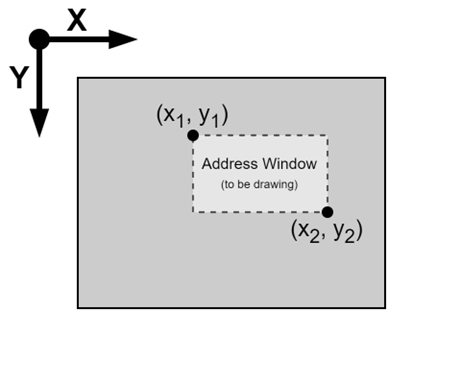
Set the address window on the LCD display of the EtherCAT slave device. Subsequent pixel-drawing operations will be performed within this area. Used in conjunction with lcdPushColors() function.
Derived Class:
| Class Name | Vendor ID | Product Code |
| EthercatDevice_QECR11UN01 | 0x00000bc3 | 0x0086d103 |
| EthercatDevice_QECR00UN01 | 0x00000bc3 | 0x0086d100 |
Syntax
int lcdSetAddrWindow(int x1, int y1, int x2, int y2);
Parameters
[in] int x1
The X-axis position of the top-left corner of the window.[in] int y1
The Y-axis position of the top-left corner of the window.[in] int x2
The X-axis position of the bottom-right corner of the window. x2 must be greater than or equal to x1 for a valid window.[in] int y2
The Y-axis position of the bottom-right corner of the window. y2 must be greater than or equal to y1 for a valid window.
Return Value
Return an error code. If the returned value is zero, it indicates a successful execution of this function.
Comment
This function must be called after a successful execution of EthercatMaster::begin(). This function is non-blocking and can be called within the Cyclic Callback.
Example
#include "Ethercat.h"

EthercatMaster master;
EthercatDevice_QECR00UN01 slave;

uint16_t buffer[256];

void CyclicCallback() {
  slave.update();
}

void setup() {
  master.begin();
  slave.attach(0, master);
  slave.lcdInit(ECAT_LCD_ILI9341_1);
  master.attachCyclicCallback(CyclicCallback);
  master.start();

  for (int i = 0; i < 128; i++)
    buffer[i] = 0xFFE0;
  for (int i = 0; i < 128; i++)
    buffer[i + 128] = 0xF800;

  slave.lcdSetAddrWindow(100, 100, 115, 115);
  slave.lcdPushColors(&buffer[0], 128, true);
  slave.lcdPushColors(&buffer[128], 128, false);
}

void loop() {
  // ...
}
Please see EthercatDevice_DmpLCD_Generic Class for more QEC Stepper Drivers instructions and API usage.