
[Tutorial]
We’re pleased to share new technical start guides to help engineers and system integrators bring up QEC-M-01 (EtherCAT MDevice) with the QEC HID Series (QEC-RXXHU)—EtherCAT-based modules that integrate RS-232/485, Keypad, LCM, and MPG (handwheel) functions for automation control.
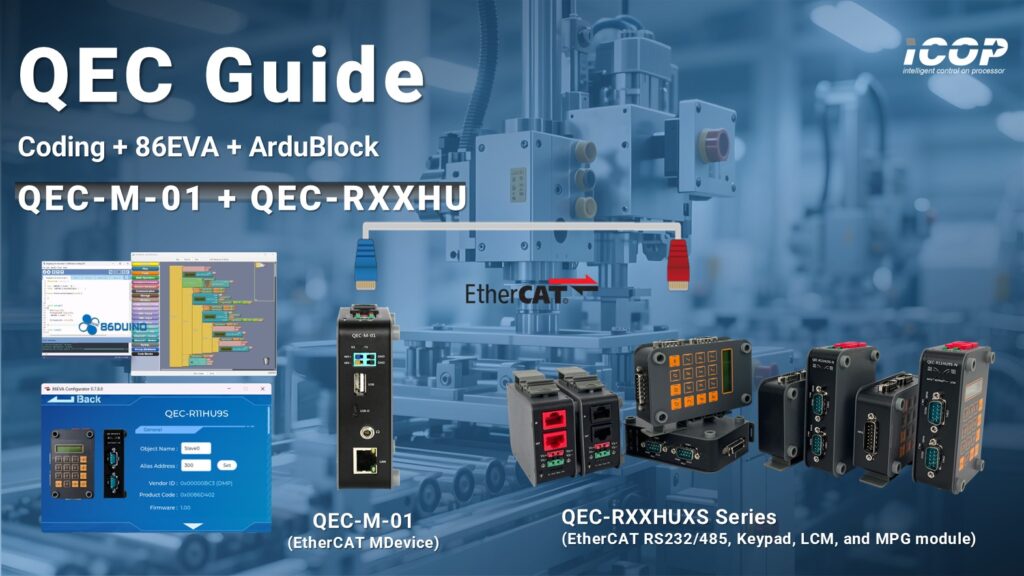
These guides provide a practical, step-by-step workflow—from wiring and EtherCAT bring-up to coding examples and integration notes—so you can accelerate commissioning and reduce engineering time.
1. System Overview
1.1 About QEC MDevice
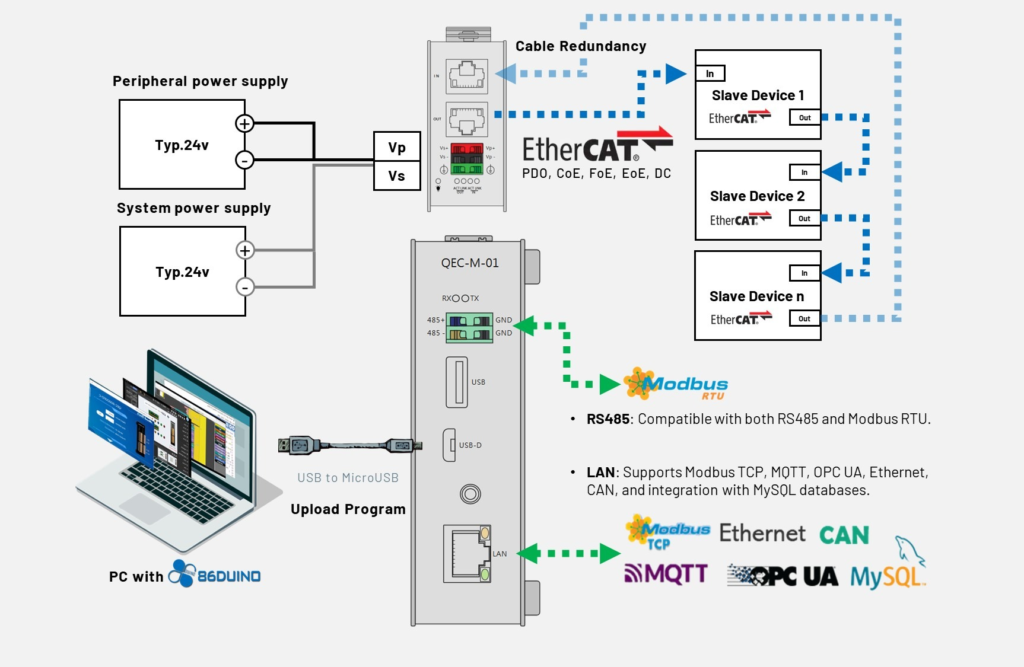
QEC-M-01 is a compact, high-performance EtherCAT MDevice designed for deterministic control and fast integration. Powered by the open-source 86Duino IDE, it offers a familiar development experience along with a real-time architecture and integrated tools.
Through EtherCAT PDO/SDO data exchange, QEC-M-01 can reliably communicate and exchange UART (RS-232/485), Keypad, LCM, and MPG data with QEC HID modules over the EtherCAT network.
Benefits of the QEC HID Series (QEC-RXXHU)
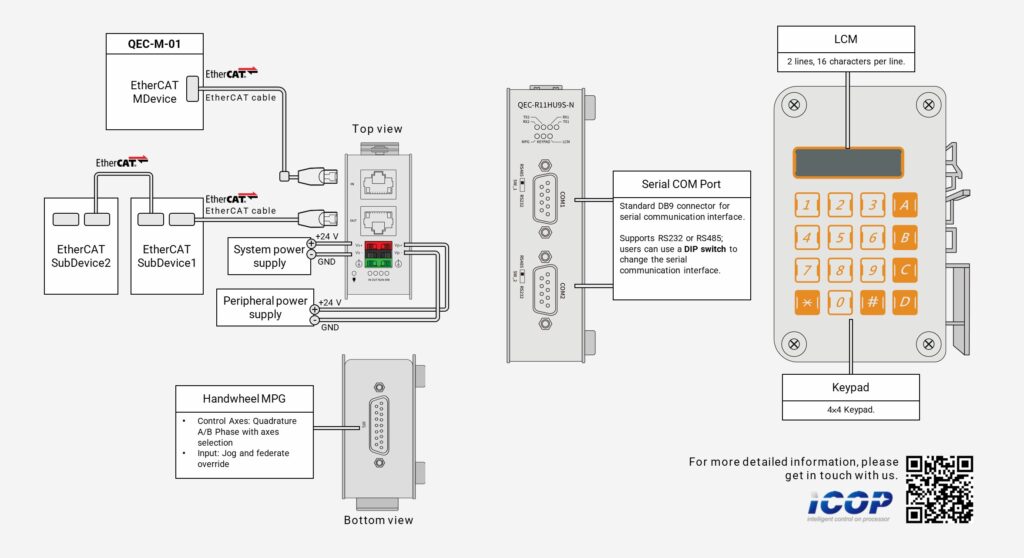
The QEC HID Series is an industrial-grade EtherCAT gateway module that integrates rich functions for both serial connectivity and operator interface needs. Key advantages include:
- Two standard UART interfaces with ESD protection, supporting RS-232 or RS-485 device connectivity
- MPG jog (handwheel) for convenient remote jogging/operation (e.g., robot/arm control)
- Keypad input + LCM display for parameter entry, status, and data visualization
2. What You’ll Get (Start Guide Highlights)

These start guides are designed for real engineering workflows and include:
- Step-by-step setup guide:
Wiring, EtherCAT network bring-up, and a recommended checklist - Programming examples:
Practical code snippets for RS-232/485, MPG, Keypad, and LCM - Integration tips & troubleshooting:
Common field issues and notes for graphical tools
2.1 Serial COM Port (RS232/485)
In this section, we will read the data from the Serial Monitor in the 86Duino IDE and transfer it from COM1 (RS-232) to COM2 (RS-232). After COM2 receives the data, we print it on the Serial Monitor.
The following program sets:
- EtherCAT Cycle Time: 1 millisecond.
- EtherCAT Mode: ECAT_SYNC.
The EthercatMaster object (“master”) represents the QEC-M-01, while the EthercatDevice_QECR11HU9S object (“slave0”) represents the QEC-R11HU9S module.
The example code is as follows:
#include "Ethercat.h"

EthercatMaster master;
EthercatDevice_QECR11HU9S slave0;

int incomingByte = 0;
char read_ch;

void setup() {
  Serial.begin(115200);

  master.begin();
  slave0.attach(0, master);
  master.start(1000000, ECAT_SYNC);

  slave0.uartSetBaud(COM1, 115200);
  slave0.uartSetFormat(COM1, SERIAL_8N1);
  slave0.uartSetBaud(COM2, 115200);
  slave0.uartSetFormat(COM2, SERIAL_8N1);
}

void loop() {
  if (Serial.available() > 0) {
    incomingByte = Serial.read();
    slave0.uartWrite(COM1, incomingByte);

    while (slave0.uartQueryRxQueue(COM2) < 1)
      slave0.update();

    if ((read_ch = (char)slave0.uartRead(COM2)) > 0) {
      Serial.print("COM2 receive: ");
      Serial.println(read_ch);
    }
  }
}
2.2 Keypad + LCM
In this section, we read keypad input and print it at specific positions on the LCM. The buzzer beeps whenever a key is pressed.
The following program sets:
- EtherCAT Cycle Time: 1 millisecond.
- EtherCAT Mode: ECAT_SYNC.
The EthercatMaster object (“master”) represents the QEC-M-01, while the EthercatDevice_QECR11HU9S object (“slave0”) represents the QEC-R11HU9S module.
The example code is as follows:
#include "Ethercat.h"

EthercatMaster master;
EthercatDevice_QECR11HU9S slave0;

int lcmY = 1;

void setup() {
  master.begin();
  slave0.attach(0, master);
  master.start(1000000, ECAT_SYNC);

  slave0.keypadClear();
  slave0.lcmClear();
}


void loop() {
  char keyPadInput = slave0.keypadRead();

  if (keyPadInput >= '0' && keyPadInput <= '9') {
    slave0.lcmGotoXY(keyPadInput - '0' + 1, lcmY);
    slave0.lcmWrite(keyPadInput);
  } else if (keyPadInput >= 'A' && keyPadInput <= 'D') {
    slave0.lcmGotoXY(keyPadInput - 'A' + 11, lcmY);
    slave0.lcmWrite(keyPadInput);
  } else if (keyPadInput == '#') {
    lcmY = 1;
    slave0.lcmClear();
  } else if (keyPadInput == '*') {
    lcmY = 2;
    slave0.lcmClear();
  }

  if (keyPadInput != 0) slave0.buzzer(3000, 200);

  slave0.update();
}
2.3 MPG Hand wheel
In this section, we will read the MPG data and status for QEC-R11HU9S and print EMG, Enable, Axis, Ratio, Raw, and Logical data through the Serial Monitor of the 86Duino IDE.
The following program sets:
- EtherCAT Cycle Time: 1 millisecond.
- EtherCAT Mode: ECAT_SYNC.
The EthercatMaster object (“master”) represents the QEC-M-01, while the EthercatDevice_QECR11HU9S object (“slave0”) represents the QEC-R11HU9S module.
The example code is as follows:
#include "Ethercat.h"

EthercatMaster master;
EthercatDevice_QECR11HU9S slave0;

void setup() {
  Serial.begin(115200);

  master.begin();
  slave0.attach(0, master);
  master.start(1000000, ECAT_SYNC);
}

void loop() {
  // Read various parameters from the slave and print them
  Serial.print("EMG: ");
  Serial.print(slave0.mpgReadEmergencyStop()); // Read and print the emergency stop status
  Serial.print(", Enable: ");
  Serial.print(slave0.mpgReadEnableSwitch()); // Read and print the enable switch status
  Serial.print(", Axis: ");
  Serial.print(slave0.mpgReadAxis()); // Read and print the axis information
  Serial.print(", Ratio: ");
  Serial.print(slave0.mpgReadRatio()); // Read and print the ratio
  Serial.print(", Raw: ");
  Serial.print(slave0.mpgReadEncoderRaw()); // Read and print the raw encoder value
  Serial.print(", Logical: ");
  Serial.println(slave0.mpgReadEncoder()); // Read and print the logical encoder value

  slave0.update();
}
If you are interested in learning more, click the link below to view the complete guide:
- RS-232/485 + Keypad + LCM + MPG – Coding
- RS-232/485 + Keypad + LCM + MPG – Coding with 86EVA
- RS-232/485 + Keypad + LCM + MPG – Coding with 86EVA and ArduBlock
If you are building an automation system that requires an EtherCAT gateway for serial connectivity and operator interface integration, pairing QEC-M-01 with the QEC HID (QEC-RXXHU) Series provides a practical solution. With EtherCAT PDO/SDO data exchange, the MDevice can stably exchange UART (RS-232/485), Keypad, LCM, and MPG data with QEC HID modules over the EtherCAT network.
For more info and sample requests, please write to info@icop.com.tw, call your nearest ICOP Branch, or contact our Worldwide Official Distributor.