This article shows how to complete motor homing calibration quickly with the QEC-R11MP3S. The QEC-R11MP3S supports CiA402 Homing Method 37. With the example sketch provided here, you can jog the motor, monitor position and encoder values, and set the current position as home, all through Serial Monitor commands.

1. At a glance
Use cases:
- Verify motor direction, position feedback, and encoder values
- On mechanisms without a home switch, jog to the desired position and set it as home directly
- Learn how to switch between CiA402 PP mode and Homing mode
2. Workflow
The QEC-R11MP3S supports CiA402 Homing Method 37, which sets the current motor position as home. This method requires no home switch, and the motor does not move during homing, making it well suited to mechanisms that are aligned manually. The workflow is as follows:
- Wire the QEC MDevice, QEC-R11MP3S, and motor (and encoder) as listed in What you need, then compile and upload the sketch with 86Duino IDE 502.
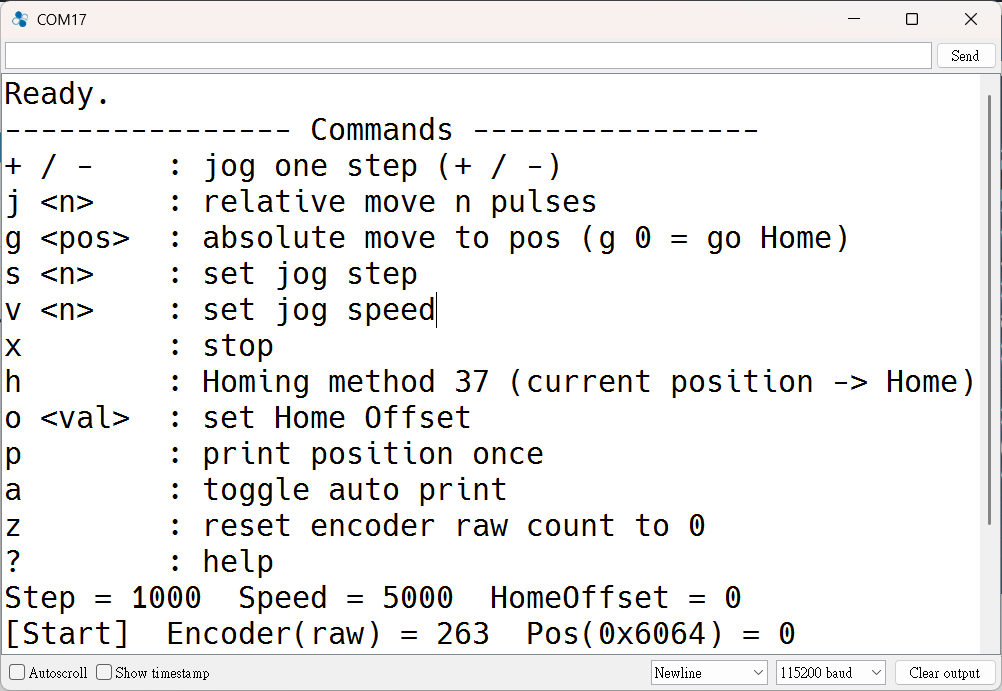
- Open Serial Monitor (115200) and confirm that
Ready.and the command list appear.
- Enter
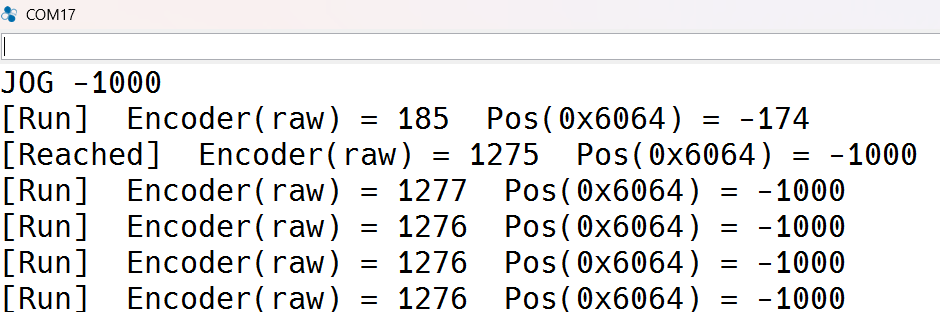
s 100to reduce the step size, then use+/-to check the motor direction and confirm thatPosandEncoder(raw)change consistently.
- Jog the mechanism to the home position and enter
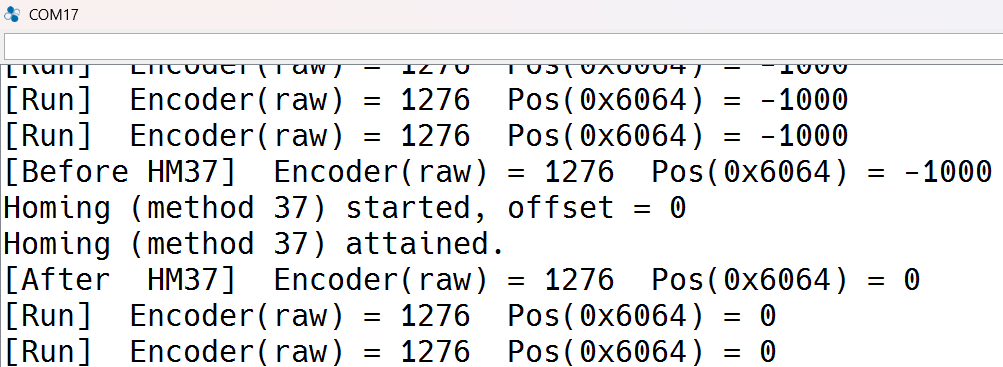
hto set home. To reset the encoder count as well, also enterz.
- Move the mechanism away from home and enter
g 0. Confirm that it returns to home and that bothPosandEncoder(raw)return to around 0.
2.1 Reading the motor encoder
If the motor has an encoder, its value can also be read through the QEC-R11MP3S. The sketch outputs both of the following values:
| Output field | Source | After setting home |
|---|---|---|
Encoder(raw) | stepper.encoderRead(ECAT_ENCODER_1), raw encoder count | Unchanged; enter z to reset |
Pos(0x6064) | motor->getPositionActualValue(), CiA402 position actual value | Updated to Home Offset |
If no encoder is connected, Encoder(raw) stays constant and the position can be monitored with Pos. If the encoder is not connected to Encoder 1, change ENCODER_NO at the top of the sketch.
2.2 Two ways to set the origin
Besides setting a software home with Homing 37, you can reset the encoder count and use it as a mechanical origin reference. The two methods can be used separately or together.
| Method | Command | Target | Purpose |
|---|---|---|---|
| Software Set Home | h | CiA402 position Pos(0x6064) set to Home Offset | Absolute moves with g use this as the coordinate origin |
| Encoder reset | z | Raw encoder count Encoder(raw) reset to 0 | Records the mechanical origin with the encoder for reference |
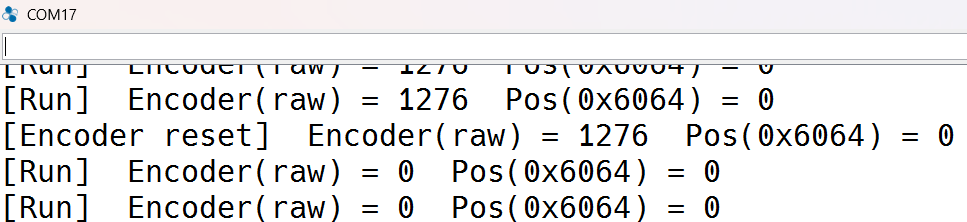
Recommended procedure: jog the mechanism to the mechanical origin, then enter h and z in sequence so that both position and encoder count start from 0.
3. Command example
Enter the following commands in Serial Monitor (115200). After each move, stop, or homing operation, the sketch outputs Encoder(raw) and Pos(0x6064).
| Command | Function | Example |
|---|---|---|
+ / - | Jog one step forward / reverse | + |
j <n> | Relative move of n pulses | j -2000 |
g <pos> | Absolute move to pos | g 0 (return to home) |
s <n> | Set jog step (default 1000) | s 100 |
v <n> | Set jog speed (default 5000) | v 2000 |
x | Stop motion | x |
h | Run Homing 37 and set the current position as home | h |
o <value> | Set Home Offset (applied at the next h) | o 1000 |
z | Reset raw encoder count (mechanical origin) | z |
p | Output current position | p |
a | Turn auto output on / off (every 500 ms) | a |
? | Show command list | ? |
4. What you need
This example is developed with 86Duino IDE 502 and uses the built-in Ethercat library (Ethercat.h). No additional libraries are required.
| Item | Description |
|---|---|
| Development tool | 86Duino IDE 502 |
| EtherCAT MDevice | QEC-M-02 |
| Motor drive ( SubDevice ) | QEC-R11MP3S (stepper motor drive, up to 3 axes) |
| Drive firmware | QEC-R11MP3S / QEC-R00MP3S firmware version 1.1.2 or later |
| Motor | One stepper motor (connected to Motor 1 in this example) |
| Encoder | Optional; if the motor has an encoder, connect it to Encoder 1 on the QEC-R11MP3S |
| Communication | Serial Monitor, 115200 baud |
The QEC MDevice is not limited to the QEC-M-02. Any QEC MDevice supported by 86Duino IDE can run this example; simply select the corresponding model under Tools → Board before compiling. No code changes are required.
The QEC-R11MP3S must be set to CiA402 Servo Mode. If it is currently in G-code controller mode, run configDeviceMode(ECAT_CIA402_SERVO_MODE) once and power-cycle the device.
Firmware version: The QEC-R11MP3S and QEC-R00MP3S require firmware version 1.1.2 or later to support the features described in this article. To update the firmware, refer to Section 2.6.1 “General” of the 86EVA User Manual.
5. Important note
- Velocity unit: The JOG velocity unit follows the Velocity Unit setting of the QEC-R11MP3S (PPS or RPM). Use
vto adjust the speed if needed, and modifyjogAccin the sketch to change acceleration. - Encoder count ratio:
Posis in motor pulses andEncoder(raw)is in encoder counts. When their resolutions differ, the two values differ by a fixed ratio. This is expected. - After power-off: Neither the home setting nor the encoder reset is retained. Set home again after power-up.
6. Resources
The example sketch is available in two versions, with Chinese or English comments; the functionality is identical. Download the attachment, open it in 86Duino IDE 502, then compile and upload:
- Example program (ZIP): CiA402-HM37-Encoder_EN | CiA402-HM37-Encoder_TW
- 86Duino IDE 502 and QEC software tools: Software
If your wiring differs from the example, modify the parameters at the top of the sketch:
| Parameter | Default | Description |
|---|---|---|
SLAVE_ID | 0 | EtherCAT SubDevice position of the QEC-R11MP3S |
MOTOR_NO | 1 | Motor axis in use (1 ~ 3) |
ENCODER_NO | ECAT_ENCODER_1 | Encoder channel to read |
jogStep / jogSpeed / jogAcc | 1000 / 5000 / 20000 | Initial JOG step, speed, and acceleration |
7. Next steps: choosing a homing method for your mechanism
There is no single correct homing method; the choice depends on your mechanism. Method 37 suits mechanisms without a home switch that are aligned manually. If your mechanism has a home switch or uses the encoder index, select the corresponding homing method so that the origin is located automatically by the signal. The QEC-R11MP3S supports the following homing methods:
| Mechanism | Homing Method |
|---|---|
| No switch; current position as home | 37 |
| Home switch (positive direction) | 19, 20 |
| Home switch (negative direction) | 21, 22 |
| Encoder index | 33 (negative direction), 34 (positive direction) |
To switch methods, change the argument of hm_SetHomingMethod(). For methods that search by moving, adjust the speeds in hm_SetHomingSpeeds() to suit your mechanism. The built-in IDE example CiA402-HM uses Method 19 with a home switch.
We will continue to deliver robust and innovative EtherCAT automation platforms that make machine integration smarter and faster. For any questions or requests, please contact us at info@qec.tw.